Grunlo vs. Housecall Pro: an honest comparison.
Housecall Pro is a polished platform — it's especially popular with HVAC and home-service trades. Here's where the two tools actually differ for landscaping and outdoor service crews, including the places Housecall Pro wins.
No credit card required · Keep your Housecall Pro account active during your trial
Who is each one really for?
If you only read one section, read this one.
You might prefer Grunlo if…
- You run an outdoor service business (landscaping, lawn care, snow, tree care) and you want recurring schedules, weather rescheduling, and route density built for that — not the HVAC-first model.
- You want a customer portal with branded subdomain, photos, and a referral program in the box.
- You want solver-based route optimization on $129 / mo (Pro, Up to 25 users) without paying for MAX-tier fleet bundles ($329/mo month-to-month) unless you truly need that stack.
- You want SMS marketing, missed-call text-back, and a shared inbox without a separate upgrade.
- You want monthly billing, transparent pricing, and a cancel button on your settings page.
You might prefer Housecall Pro if…
- You’re a home-services business (HVAC, plumbing, electrical, cleaning) where their product gravity is strongest.
- You depend on the in-house Capital / instant-payout product or a specific industry partnership Housecall Pro has built.
- You want their merchant-services-style payment terms specifically.
- You’re running a multi-location franchise with their franchise-specific tooling.
Feature-by-feature, no fluff.
We pulled these from Housecall Pro's public pricing and feature pages. Where we say a competitor wins, they win.
| Feature | Grunlo | Housecall Pro |
|---|---|---|
| Pricing & contract | ||
|
Starting plan (monthly billing)
Month-to-month price for the entry tier on each platform (HCP also advertises lower figures when billed annually).
|
$59 / mo (Starter, Up to 5 users) | $79 / mo (Basic, 1 user) housecallpro.com/pricing |
|
Mid-tier plan (monthly billing)
Mid tier with QuickBooks import, GPS tracking, and marketing tools on the HCP side.
|
$129 / mo (Pro, Up to 25 users) | $189 / mo (Essentials, 5 users) housecallpro.com/pricing |
|
Top-tier plan (monthly billing)
Scaling tier with advanced reporting; MAX lists extra per-user fees on their pricing page.
|
$249 / mo (Business, Up to 150 users) | $329 / mo (MAX, 8 users) + add-on users housecallpro.com/pricing |
|
Staff users included
Included seats on default paid tiers.
|
Up to 5 users · Up to 25 users · Up to 150 users | 1 (Basic) · 5 (Essentials) · 8 (MAX) housecallpro.com/pricing |
| Annual contract required? | No, monthly | No, monthly |
|
Cancel from account (no retention call)
Policies change — follow the competitor's latest billing help article.
|
||
| Customer communications | ||
| Missed-call text-back | Business+ | housecallpro.com/features |
| Two-way SMS inbox (shared with team) | Pro+ | |
|
SMS marketing campaigns
Housecall Pro sells Campaigns as a paid add-on.
|
housecallpro.com/pricing | |
| Dedicated business phone number | Pro+ | |
| Voicemail transcription | Business+ | |
| Field & dispatch | ||
|
Automatic multi-stop route optimization
Solver-style reordering for minimum drive time. Housecall Pro includes dispatch mapping and GPS on paid plans; fleet-grade routing, VGPS, and dashcam programs are marketed heavily on MAX and as add-ons — confirm your exact workflow on their site.
|
Pro+ | housecallpro.com/pricing |
| Live GPS field tracking | Pro+ | Essentials+ |
|
Field tech mobile app (no install)
Browser-based; no app store install or per-seat charge.
|
x (native app required) | |
| Photos before/after on every visit | ||
| Recurring jobs & visit calendars | ||
|
Weather-aware rescheduling
Outdoor-service-specific; rain pushes mowing forward automatically.
|
||
| Customer-facing | ||
| Customer portal (jobs, invoices, photos, payments) | ||
| Online estimate approval (with signature) | ||
|
Branded customer subdomain
A bookable mini-site for your business with photos and a request form.
|
||
| Built-in customer referral program | ||
| Money | ||
| Online card payments | check (Stripe) | check (HCP Payments) |
| Auto-invoicing on job completion | ||
| QuickBooks Online sync | Business+ | Essentials+ |
|
Stripe Tax (auto sales tax)
Optional jurisdiction-aware tax via Stripe Tax where enabled.
|
||
| Same-day or instant payouts | ||
| Data & trust | ||
|
Export data to CSV from settings
Customers, jobs, invoices, and more.
|
||
|
Small team support
We are a small product company; complex issues can reach the engineers who build the software.
|
||
| Public app marketplace / large integration list | ||
All prices shown at month-to-month billing rates unless noted · Grunlo prices match our homepage and are read live from this site’s plan catalog · Sources cited above · Last verified May 2026. Spot something out of date? Tell us and we'll correct it.
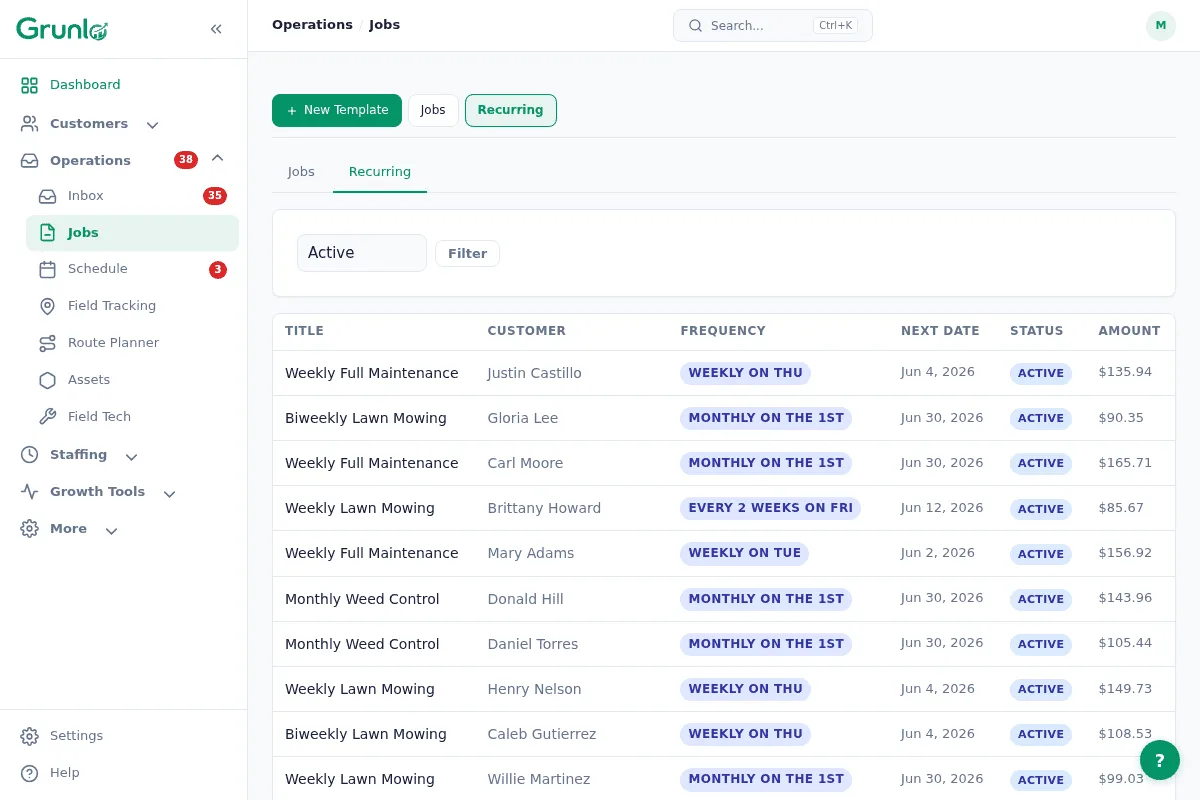
Built around outdoor recurring services, not HVAC service calls.
Housecall Pro is exceptional at one-off home service calls. Where Grunlo is built differently is the recurring outdoor service model: weekly mowing routes that bunch by neighborhood, weather-aware rescheduling, and route density that beats a generic dispatcher.
- Recurring schedules with skip-this-week, pause-for-winter, and seasonal pricing
- Weather rescheduling pushes outdoor jobs automatically when rain hits
- Route optimization prioritizes geographic density — 8 lawns per neighborhood beats 8 lawns across town
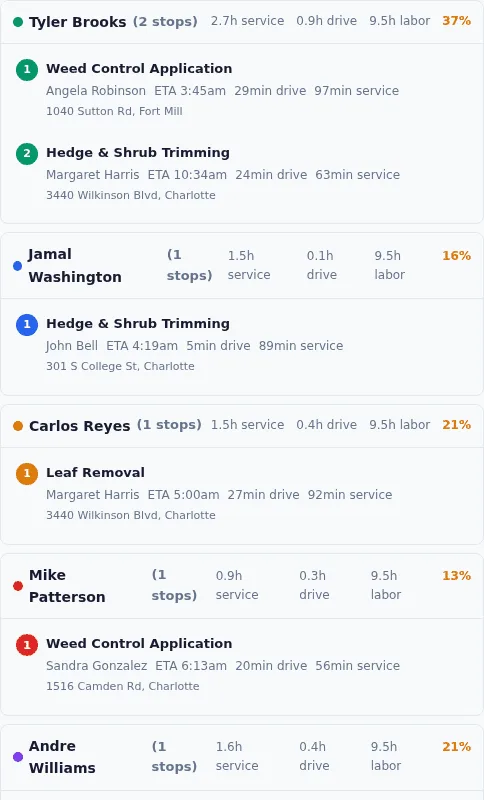
Solver-based routing without the MAX price tag.
Grunlo Pro ($129/mo, Up to 25 users) includes daily multi-stop route optimization built for dense lawn and landscape routes. Housecall Pro gives every paid plan dispatch and mapping tools, but the fleet-grade routing, VGPS, and dashcam programs they advertise for cutting miles are positioned on MAX ($329/mo month-to-month before add-on users) and paid add-ons — model your real stack before comparing headline prices.
- Generate the optimized route for tomorrow at end-of-day, every day
- Drag-drop manual override with travel-time recalculation in real time
- Multi-crew aware — the optimizer balances stops across your trucks
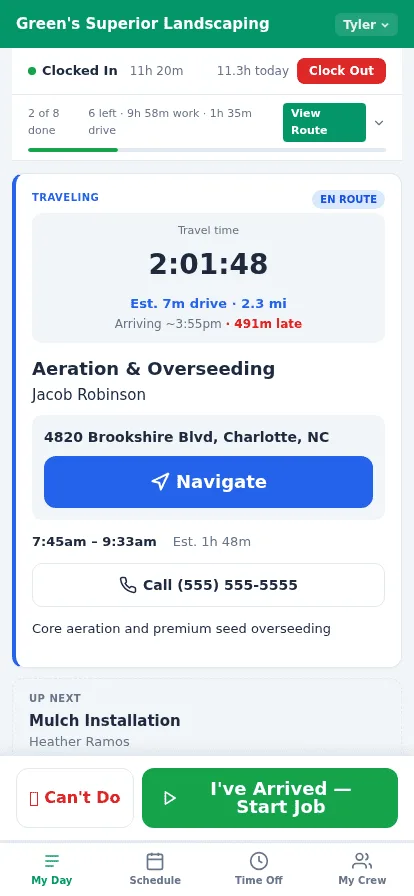
No native-app install for your crew.
Grunlo's field tech experience runs in the browser on whatever phone your crew already owns. There is no app store install, no per-seat charge, no "you have to update the app" friction. Housecall Pro uses a native iOS/Android app, which is more polished but adds an install step for every new hire.
- New hire onboarding: open a URL, log in, see today's jobs — no install
- Update the platform; the crew's phones get the new version automatically
- Cross-platform — iOS, Android, even an old tablet works the same way
Already on Housecall Pro? Switching is easier than you think.
We import your customers, jobs, recurring schedules, and invoices for free. Run both accounts in parallel for two weeks — cancel Housecall Pro only when you’re ready. See the full switch process →
What people ask before they switch.
Everything you need to know before getting started.
Try Grunlo alongside your Housecall Pro account.
Run both for two weeks. If we're not the better fit for your business, you'll know by the end. Your Housecall Pro account stays active — you cancel only when you decide.
No credit card required · Free import from Housecall Pro · Cancel Housecall Pro on your own timeline